
You know that feeling when you open a file to make a quick fix, only to spend three hours untangling nested loops and hidden dependencies? That frustration isn't just bad luck. It's a symptom of poor software maintainability, which is the measure of how easy it is to understand, modify, and extend code without introducing new bugs. For years, teams relied on single numbers like cyclomatic complexity to gauge this risk. But those old metrics often missed the real pain points for developers.
Today, we have better tools. By combining Cognitive Complexity, a metric designed to measure mental effort, with traditional coupling metrics like fan-in and fan-out, you can pinpoint exactly where your codebase is fragile. This guide breaks down how these two approaches work together to give you a realistic view of your system's health.
Why Old Metrics Fall Short
To understand why we need new measures, look at what came before. In the 1970s, Thomas McCabe introduced cyclomatic complexity. It counts the number of independent paths through your code. If you have five `if` statements, the score goes up. The idea was simple: more paths mean you need more tests to cover them all.
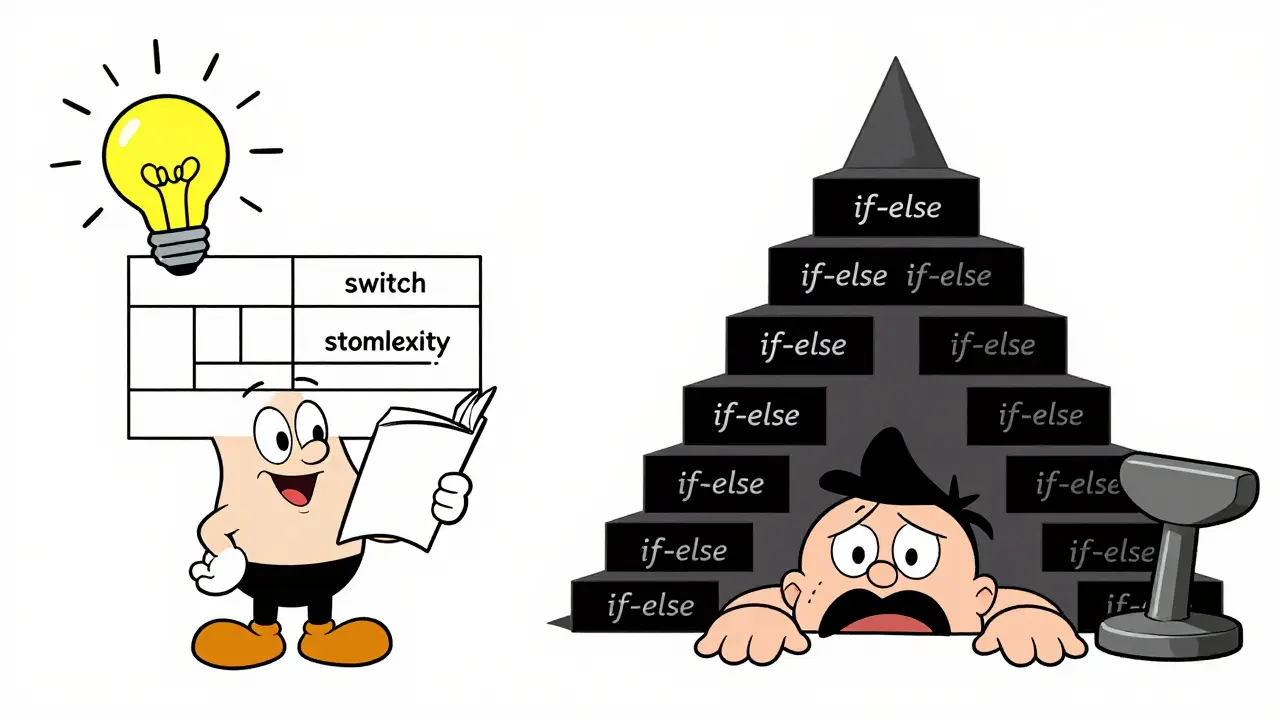
But here is the problem: cyclomatic complexity measures testability, not understandability. A switch statement with ten cases might have a high cyclomatic score because there are ten paths. However, reading that switch statement is usually straightforward for a human. Conversely, a deeply nested set of `if` conditions inside a `while` loop might have a moderate cyclomatic score but be nearly impossible to follow mentally.
This gap between "how many tests do I need" and "how hard is this to read" led SonarSource to introduce Cognitive Complexity in 2017. The goal was to create a metric that correlates with the actual cognitive load a developer experiences when reading code.
Understanding Cognitive Complexity
Cognitive Complexity focuses on control flow and nesting. It starts every function with a base score of zero and adds points based on specific rules that mimic human reading habits. Here is how the calculation works:
- Breaks in linear flow: Every time you use a conditional (`if`, `else`) or a loop (`for`, `while`), the score increases by 1. These structures force the reader to pause and think about different scenarios.
- Nesting penalties: This is the key difference from older metrics. Each level of indentation adds +1 to the score. A simple `if` inside another `if` costs more than two separate `if` statements at the same level. Deep nesting is visually and mentally taxing.
- Logical operators: Complex boolean expressions using `&&` or `||` add points for each operator sequence, reflecting the mental effort required to evaluate combined conditions.
- Recursion: Recursive calls add significant weight because they require tracking state across multiple stack frames.
SonarSource deliberately treats certain constructs differently. For example, a `switch` statement gets a flat cost of 1, regardless of how many cases it has. Why? Because humans can scan a switch block quickly. We don't get lost in the logic the way we do with nested `if-else` chains.
In practice, most static analysis tools like SonarQube set default thresholds to flag risky code. For languages like Java, Python, and JavaScript, the limit is typically 15. For C-family languages like C++ and C#, the threshold is higher, at 25, acknowledging their more verbose syntax. When a method exceeds these limits, it signals that the code is likely too complex for safe maintenance.
The Role of Coupling Metrics
While Cognitive Complexity looks inside a single function, coupling metrics look outward. They measure how tightly connected your modules are. High coupling means a change in one place ripples through many others, increasing the risk of breaking things.
The two most common coupling indicators are fan-in and fan-out:
- Fan-in: The number of other modules or functions that call your component. High fan-in suggests your module is a critical dependency. If you change its interface, you might break dozens of callers.
- Fan-out: The number of modules your component calls. High fan-out means your module depends on many external collaborators. This makes it harder to understand the context needed to run or test the function.
A classic heuristic from cognitive psychology suggests an optimal fan-out of 7 ± 2. This aligns with the human brain's capacity to hold about five to nine items in working memory. If a function calls fifteen other services, it becomes difficult to track the overall behavior.
Another powerful metric is the Information Flow Index (IF). It combines fan-in and fan-out into a single risk score using the formula:
| Formula Component | Description |
|---|---|
IF(A) = [FAN-IN(A) × FAN-OUT(A)]² |
The squared product of inbound and outbound connections. |
Because the result is squared, components with both high fan-in and high fan-out spike dramatically. For instance, a module with a fan-in of 4 and a fan-out of 5 has an IF score of 400. This flags it as a major maintenance hotspot-changing it is risky because it sits at a dense intersection of dependencies.
Combining Metrics for Better Insights
Using either metric alone gives you half the picture. Cognitive Complexity tells you if a function is hard to read. Coupling metrics tell you if a function is dangerous to change. The real value comes when you combine them.
Imagine a function with low Cognitive Complexity (score of 5) but extremely high fan-in (called by 50 other places). It is easy to read, but you must be incredibly careful modifying it because the blast radius is huge. Now imagine a function with high Cognitive Complexity (score of 30) but low coupling. It is messy and hard to understand, but since nothing else depends on it, you can refactor it safely without worrying about side effects.
The worst-case scenario is high complexity plus high coupling. These are your true technical debt hotspots. They are hard to understand, and changing them risks breaking the rest of the system. Prioritize refactoring these first.
| Cognitive Complexity | Coupling (Fan-In/Fan-Out) | Maintenance Strategy |
|---|---|---|
| Low | Low | Safe. Standard review process. |
| High | Low | Refactor internally. Low risk of external breakage. |
| Low | High | Freeze changes. Add extensive integration tests before modification. |
| High | High | Critical Hotspot. Prioritize immediate refactoring or isolation. |

Implementing Metrics in Your Workflow
You don't need expensive enterprise tools to start measuring these values. SonarQube Community Edition is free and includes built-in support for Cognitive Complexity. You can also use SonarLint, an IDE extension, to see scores directly while you code.
Here is a practical approach to integrating these metrics:
- Set Baselines: Run an analysis on your current codebase. Don't expect perfect scores immediately. Note the average Cognitive Complexity and the highest coupling scores.
- Enforce at the Function Level: Avoid setting project-wide Quality Gates that fail the entire build if the average complexity is slightly high. Instead, enforce rules on individual methods. For example, reject any new pull request that introduces a method with a Cognitive Complexity above 15.
- Use CI/CD Pipelines: Integrate static analysis into your continuous integration pipeline. Flag violations automatically so developers address them before merging code.
- Review Call Graphs: Use tools that visualize call graphs to identify high fan-in/fan-out modules. Look for nodes that are central to the graph; these are your architectural anchors.
Remember, metrics are guides, not laws. A score of 16 might be acceptable for a highly optimized algorithm where readability is secondary to performance. Context matters. Use the numbers to spark discussion during code reviews, not to replace human judgment.
Common Pitfalls to Avoid
One mistake teams make is treating Cognitive Complexity as a silver bullet. Empirical studies, including research published in the Journal of Systems and Software in 2023, show that while Cognitive Complexity correlates well with understandability, it doesn't always outperform traditional metrics significantly. It is best used as part of a broader toolkit.
Another pitfall is ignoring the "why" behind high scores. Sometimes, high complexity is justified. If you are parsing a complex protocol or handling intricate business rules, some nesting is inevitable. In these cases, consider extracting helper methods or using early returns to flatten the structure, rather than forcing artificial simplification that hides logic.
Finally, don't neglect coupling. You can write perfectly readable functions, but if they are tangled in a web of circular dependencies, your system will still be unmaintainable. Regularly audit your fan-in and fan-out values to ensure your architecture remains modular.
What is the ideal Cognitive Complexity score?
For most languages like Java, Python, and JavaScript, a score below 15 is considered safe. For C-family languages like C++ and C#, the threshold is typically 25. Scores above these limits indicate that the code may be difficult to understand and should be reviewed for refactoring opportunities.
How does Cognitive Complexity differ from Cyclomatic Complexity?
Cyclomatic Complexity counts the number of independent execution paths, primarily measuring testability. Cognitive Complexity focuses on the mental effort required to read code, penalizing nesting and deep indentation more heavily. It aims to reflect human understandability rather than just path coverage.
What is fan-in and fan-out in software engineering?
Fan-in is the number of modules that call a specific component, indicating its importance as a dependency. Fan-out is the number of modules a component calls, indicating its reliance on external services. High values in either direction can signal potential maintenance risks.
Is Cognitive Complexity supported in free tools?
Yes. SonarQube Community Edition, which is free to use, includes Cognitive Complexity analysis. Additionally, SonarLint, the IDE plugin, provides real-time feedback on cognitive complexity scores while you develop.
Should I use Cognitive Complexity instead of Cyclomatic Complexity?
It depends on your goal. If you want to ensure thorough testing coverage, Cyclomatic Complexity is useful. If you want to improve code readability and maintainability, Cognitive Complexity is generally preferred because it aligns better with developer experience. Many teams use both for a comprehensive view.
Metrics are just numbers. They dont tell you if the code is good or bad, they just tell you what it looks like on paper. I have seen clean code with high complexity scores that worked perfectly and messy code with low scores that broke everything. Stop worshipping the metric.
I completely disagree with this take. The metrics provide a necessary baseline for teams who lack experienced architects. Without these guardrails, junior developers often introduce subtle bugs that go unnoticed until production. It is not about worshiping numbers but about creating a shared language for quality assurance across large organizations.
You both make valid points, but let us look at the practical application here. The article suggests using Cognitive Complexity as a guide rather than a law, which is crucial. When I implemented SonarQube in my last role, we initially set strict gates that caused friction. We adjusted our approach to focus on individual method reviews instead of project-wide averages. This shift allowed us to catch issues early without stifling creativity. The key is context. A score of 16 might be fine for a parser but terrible for a simple getter. We must encourage teams to discuss the why behind the scores during code reviews. This fosters a culture of learning rather than compliance. It helps everyone understand the trade-offs involved in complex logic versus readability. Over time, this leads to better design decisions naturally.
I really appreciate how you highlighted the importance of context in determining whether a high complexity score is acceptable or not, because I have found that many teams struggle with this exact nuance when they first start adopting static analysis tools, and it can lead to unnecessary refactoring efforts that do not actually improve the codebase maintainability in any meaningful way, so focusing on the discussion aspect of code reviews is definitely the right path forward for fostering a healthier development environment where everyone feels empowered to explain their design choices rather than just defending against arbitrary numerical thresholds.
Let me clarify the technical distinction here for those confused by the debate. Cyclomatic complexity measures test coverage requirements based on linearly independent paths, whereas Cognitive Complexity specifically penalizes nesting depth and logical operators to approximate human cognitive load during reading. In India, we prioritize rigorous adherence to these standards because scalable systems require predictable maintenance costs. Ignoring coupling metrics like fan-in and fan-out while obsessing over local complexity is a fundamental architectural error. You cannot have maintainable software if your modules are tightly coupled regardless of how readable individual functions appear. Use the Information Flow Index to identify critical nodes in your dependency graph before worrying about minor nesting issues.