
Why LLM Infrastructure Is Not Just More Servers
Running a large language model in production isn’t like deploying a web app. You can’t just throw it on a cloud VM and call it done. These models are massive-some weighing over 600 GB in memory-and they need specialized hardware, smart architecture, and careful tuning just to respond to a single user query in under a second. If you’re thinking of serving LLMs for customer chat, content generation, or internal tools, you need to understand what’s really required-not just what’s advertised.
Hardware: GPUs Are the New CPUs
At the heart of every production LLM is a cluster of high-end GPUs. Smaller models like 7B-parameter versions can run on a single NVIDIA A100 or H100, but anything larger-say, Qwen3 235B-needs at least 600 GB of VRAM. That means stacking multiple high-end GPUs together. Most teams use 4 to 8 GPUs for models over 70B parameters. Memory bandwidth matters too: an H100 delivers 3.35 TB/s, while an A100 only offers 1.6 TB/s. That difference can mean the difference between a response in 300 ms or 1.2 seconds.
It’s not just about raw power. The model weights have to fit in memory. If your model is 80 GB, you need at least 80 GB of VRAM per GPU, plus overhead. Many teams use quantization-reducing precision from 16-bit to 4-bit-to shrink memory use by 4x. That cuts costs and lets you run bigger models on fewer cards. But there’s a trade-off: you might lose 1-5% accuracy. For customer-facing apps, that’s often acceptable. For legal or medical use cases? Not always.
Storage: Tiered Systems Save Money
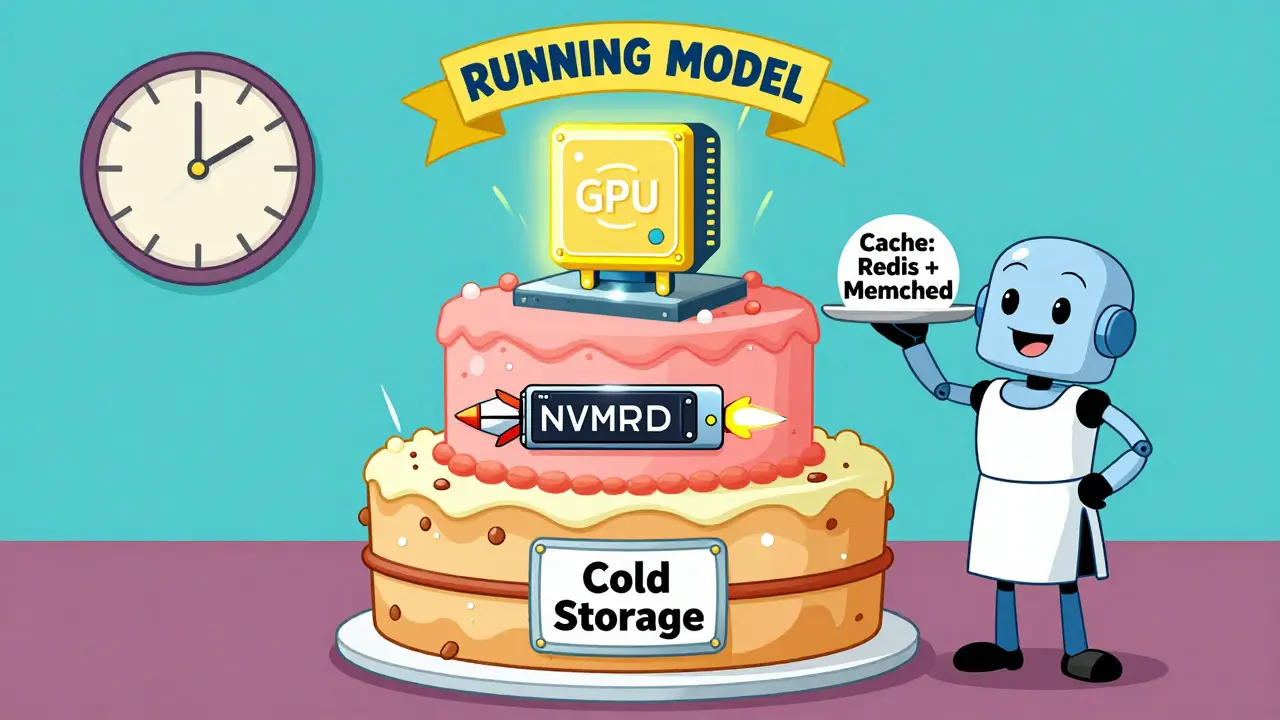
LLM weights aren’t just big-they’re static. Once loaded, they rarely change. That makes storage design critical. You don’t need fast NVMe disks for the model itself. Instead, use a tiered approach:
- Object storage (like AWS S3) for cold backups: $0.023/GB/month
- NVMe SSDs for active model loading: $0.084/GB/month
- RAM or GPU memory for running models
Many teams load models from S3 into local NVMe storage before spinning up inference servers. This avoids network bottlenecks and keeps startup times under 30 seconds. Caching layers-like Redis or Memcached-are also common for frequently requested prompts or responses, cutting repeated computation by up to 40%.
Networking: Speed Matters More Than You Think
If you’re running models across multiple servers, your network can become the bottleneck. For distributed inference, you need 100+ Gbps interconnects between nodes. InfiniBand or NVIDIA’s NVLink are preferred over standard Ethernet. Latency between GPUs in the same rack should be under 10 microseconds. Cross-data-center setups? Avoid them for interactive apps. Stanford’s Dr. Emily Zhang found that even 20 ms of network delay makes chatbots feel sluggish-users notice, and they leave.
Containerization and Deployment: It’s Not Docker 101
You can’t just containerize an LLM like you would a Node.js app. Models are 10-200 GB. GPU drivers must match the container’s CUDA version. Dependencies need pinning. Northflank’s 2025 deployment guide says 78% of teams struggle with GPU compatibility during CI/CD.
Best practices:
- Use a base image with the exact CUDA version your model was trained on
- Bundle model weights inside the container, or mount them from secure storage
- Run security scans (Trivy, Snyk) on every build
- Test memory allocation in a sandbox before going live
Tools like vLLM and Text Generation Inference (TGI) are optimized for this. They handle batching, memory sharing, and async response streaming out of the box-something you’d have to build yourself otherwise.
Scaling: Dynamic Is the Only Way
LLM traffic isn’t steady. You might get 5 requests per minute at 3 a.m. and 500 at 11 a.m. Static provisioning wastes money. Dynamic scaling saves it.
Use Kubernetes Horizontal Pod Autoscaler (HPA) with custom metrics like queue length or request latency. When requests pile up, spin up new containers. When they drop, shut them down. Andrei Karpathy, former AI lead at Tesla, says this is non-negotiable: “You can’t predict usage. You must respond to it.”
Cloud providers like AWS SageMaker and Google Vertex AI offer managed autoscaling. But if you’re self-hosting, you’ll need to build or integrate with tools like KEDA or Prometheus for custom metrics.
Costs: The Real Price Tag
Here’s what it costs to run LLMs in production:
| Approach | Monthly Cost (Est.) | Control Level | Time to Deploy |
|---|---|---|---|
| Cloud API (OpenAI GPT-3.5-turbo) | $15,000-$100,000+ | Low | Hours |
| Managed Cloud (AWS SageMaker) | $20,000-$80,000 | Moderate | 1-2 weeks |
| Self-hosted (Kubernetes + 4x H100) | $15,000-$40,000 | High | 3-6 months |
| On-premises (Dedicated Cluster) | $50,000-$200,000+ | Very High | 6+ months |
Most companies start with APIs. But once they hit 10M+ monthly tokens, self-hosting becomes cheaper. Qwak’s 2024 data shows a 40-60% cost reduction after 12 months of self-hosting. The catch? You need MLOps engineers. If you don’t have them, the hidden costs of downtime, misconfigurations, and debugging add up fast.
Hybrid Is the New Standard
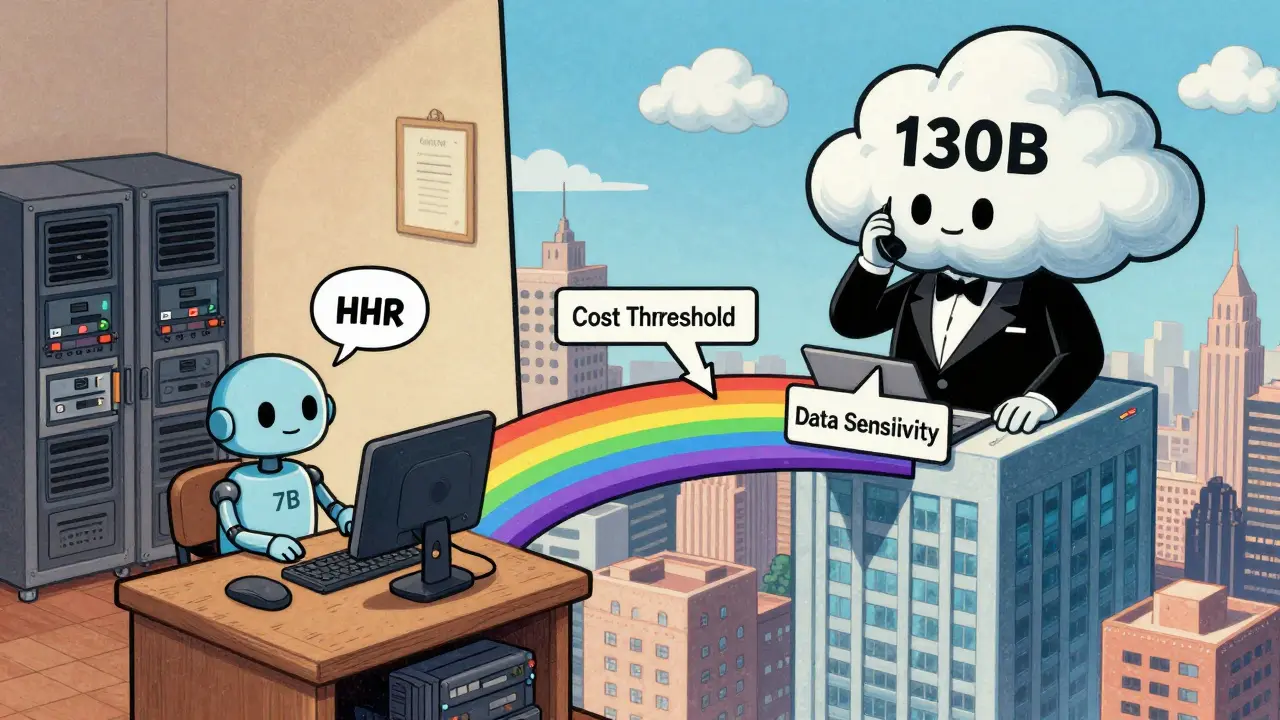
Only 12% of enterprises use pure cloud or pure on-prem today. The rest use hybrid models: sensitive data stays in-house, general inference runs on the cloud. Logic Monitor’s 2025 survey found 68% of companies now use this approach.
Why? It balances security, cost, and performance. You can run a 7B model on-prem for internal HR chat, and send complex 130B queries to AWS during peak hours. Tools like LangChain and LlamaIndex help stitch these systems together. They let you route prompts based on user role, data sensitivity, or cost thresholds.
Emerging Trends You Can’t Ignore
Two things are changing fast:
- Quantization: 4-bit and 8-bit models are now standard. By 2026, Gartner predicts 50% of enterprise LLMs will use quantized weights.
- Specialized chips: NVIDIA’s Blackwell GPUs, launched in March 2025, deliver 4x the throughput of H100s for LLM inference. They’re already being adopted by top-tier cloud providers.
Also, Retrieval-Augmented Generation (RAG) is no longer optional. If your LLM needs to answer questions using up-to-date data (like product catalogs or internal docs), you need a vector database. Pinecone, Weaviate, and Chroma are now as common as PostgreSQL in LLM stacks.
What Goes Wrong (And How to Avoid It)
Most teams fail not because of hardware, but because of process. Here are the top three pitfalls:
- Skipping sandbox testing: Never deploy a new model or quantization method directly to production. Test memory usage, latency, and accuracy in isolation first.
- Ignoring health checks: If a GPU crashes or a container hangs, you need automatic failover. Set up liveness and readiness probes with a 10-second timeout.
- Underestimating latency: A 1.5-second response feels slow. Aim for under 500 ms. Use batching, caching, and streaming to get there.
Teams that follow these practices see 25-40% lower operational costs, according to Neptune.ai’s 2024 study. That’s not just savings-it’s reliability.
Final Reality Check
LLM infrastructure isn’t about buying the most powerful hardware. It’s about matching the right tools to your use case. If you’re building a customer support bot, you don’t need a 235B model. A quantized 13B model on 2x H100s will do the job better, faster, and cheaper.
Start small. Test often. Measure everything. And don’t let vendor hype push you into over-engineering. The goal isn’t to run the biggest model. It’s to deliver value-reliably, affordably, and at scale.
What’s the minimum GPU memory needed to run a 7B LLM in production?
A 7B parameter model typically needs at least 16-20 GB of VRAM for smooth inference. With quantization (4-bit), you can run it on a single 16 GB GPU like an NVIDIA A10. For production, aim for 24 GB to handle batching and avoid memory spikes.
Can I run LLMs on CPUs instead of GPUs?
Technically yes, but practically no. CPUs are 10-50x slower than GPUs for LLM inference. A 7B model might take 10-30 seconds per response on a high-end CPU. That’s unusable for interactive apps. GPUs are mandatory for production.
Is it cheaper to use OpenAI’s API or host my own model?
If you’re under 5 million tokens per month, OpenAI is cheaper. Beyond that, self-hosting becomes more cost-effective. At 20 million tokens/month, hosting a 13B model on 2x H100s costs roughly $18,000/month-about half the price of OpenAI. But you need engineering resources to manage it.
Do I need Kubernetes to serve LLMs?
Not always, but it’s the best option for production. Kubernetes handles scaling, failover, and updates automatically. For a single model with steady traffic, a Docker container on a dedicated server works. But if you’re serving multiple models or unpredictable traffic, Kubernetes is the standard for a reason.
What’s the biggest mistake companies make when deploying LLMs?
Trying to run the biggest model possible. Most businesses don’t need a 70B+ model. A well-tuned 13B model with RAG and proper caching performs better and costs 70% less. Focus on the user experience, not the model size.
How long does it take to build LLM infrastructure from scratch?
With a skilled MLOps team, you can have a basic pipeline running in 2-3 months. That includes containerization, autoscaling, monitoring, and security. Without experience, it can take 6-9 months-and you’ll likely overpay for mistakes.
Next Steps
If you’re starting out, begin with a 7B-13B model and a cloud API. Measure your token usage, response times, and user feedback. Once you hit 5-10 million tokens/month, start evaluating self-hosted options. Test quantization, batching, and caching in a sandbox. Build your pipeline slowly. Don’t rush to the biggest model. Build what solves your problem-and nothing more.



Anyone who thinks they can run a 7B model on a 16GB GPU without crashes is delusional. I’ve seen it happen - 3 AM production outage because someone ‘optimized’ with 4-bit and forgot about peak load. You want reliability? 24GB minimum. No exceptions.
It’s fascinating - we’re treating LLMs like they’re just another piece of software, when in reality, they’re more like living organisms: hungry for power, sensitive to environment, and utterly unforgiving of poor care. We build clusters like cathedrals… and then wonder why they collapse under the weight of our ambition.
Stop overcomplicating this. If you need a 235B model, you’re doing it wrong. Most companies are just using LLMs to sound fancy. Run a 7B quantized model, use caching, and call it a day. The rest is VC-driven nonsense.
Wait so you’re telling me I can’t just throw a llama model on a Raspberry Pi and have it answer my emails? What a scam.
Oh wow, another ‘guide’ from someone who’s never deployed a model in anger. You mention Kubernetes like it’s magic dust. Meanwhile, real teams are stuck debugging CUDA version mismatches for weeks because some ‘best practice’ told them to ‘bundle weights in the container.’ Congrats, now your CI/CD pipeline is a funeral pyre. And you wonder why startups fail?
This is actually one of the clearest breakdowns I’ve seen. A lot of people get scared off by the hardware talk, but the real takeaway is: start small, measure everything, and don’t chase model size like it’s a trophy. I’ve seen teams burn $200k on a 70B model when a 13B with RAG did 90% of the job. You’re not winning by being the biggest - you’re winning by being the most reliable.
It is imperative to underscore the fundamental paradigm shift that large language model deployment necessitates: the transition from traditional software engineering paradigms to a discipline that integrates computational physics, memory hierarchy optimization, and real-time latency economics. The notion that containerization can be treated analogously to conventional web services is not merely inadequate-it is epistemologically flawed. The architectural constraints imposed by GPU memory bandwidth, interconnect latency, and quantization-induced precision loss demand a re-engineering of operational workflows at the ontological level. Moreover, the assertion that Kubernetes is ‘the best option’ must be contextualized within the operational maturity of the deploying entity; for organizations lacking MLOps infrastructure, managed services remain not merely prudent, but ethically responsible. The pursuit of cost efficiency must never supersede the imperative of system robustness, particularly in domains where user trust is non-fungible.